Keeping the Ring doorbell lens clear is essential for clear video and reliable motion alerts. This guide walks through safe practices, recommended tools, and step-by-step instructions to clean the lens without risking damage to the device.
Using proper cleaning techniques helps preserve camera clarity and extend the life of the device. Readers will find practical tips, common pitfalls to avoid, and a buying guide to select reliable accessories for camera lens maintenance.
Quick Answer
Turn off power to the doorbell, gently remove loose debris, then use a microfiber cloth or a lens cleaning pen with minimal liquid. For stubborn smudges, use isopropyl alcohol wipes lightly, and finish with a dry microfiber cloth. Avoid abrasive materials and excessive moisture near electronic components.
What You’ll Need
- camera lens cleaning kit microfiber cloth brush
- isopropyl alcohol lens cleaning wipes electronics
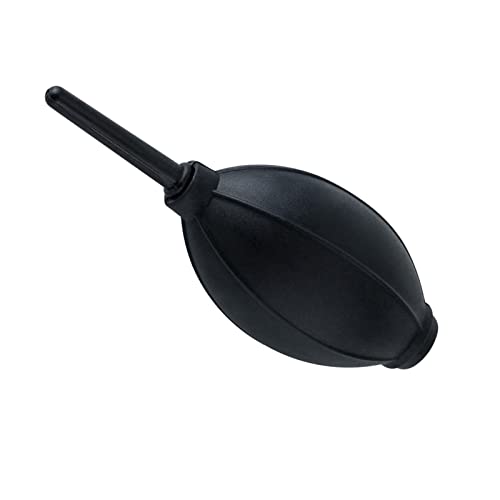
- air blower for camera lens cleaning
- lens cleaning pen for cameras electronics
- microfiber cloth for camera lens cleaning electronics kit


Before You Start
Before cleaning, power down the Ring doorbell and disconnect it if possible to avoid short circuits. Work in a dry, dust-free area and use soft, lint-free tools. Avoid applying liquids directly to the lens or electronics; apply only to the cloth or wipe. Allow any moisture to evaporate completely before reactivating the device. Expect a quick cleaning session to take only a few minutes.
Step-By-Step: How To Clean The Ring Doorbell Lens
- Power down the device and remove from its mounting if accessible to ensure full safety during cleaning.
- Blow away loose dust with a gentle air blower to prevent scratching the glass.
- Gently wipe the lens with a clean microfiber cloth to remove surface smudges.
- If smudges persist, apply a tiny amount of isopropyl alcohol to a microfiber cloth or a lens cleaning wipe and lightly dab the lens edge. Avoid applying liquid directly to the lens.
- Use a lens cleaning pen for delicate edges or to lift soft residues without abrasion.
- Wipe again with a dry microfiber cloth to remove any remaining moisture and restore a clear surface.
- Inspect from different angles to ensure no smudges remain; repeat only if necessary.
- Reassemble and mount the doorbell, then test video clarity and field of view.
- Store cleaning supplies in a cool, dry place away from direct sunlight for best longevity.
- If you notice fogging or persistent haziness after cleaning, consider professional service or device replacement options.
Troubleshooting
| Symptom | Likely Cause | Fix | Prevention |
|---|---|---|---|
| Blurry or hazy video after cleaning | Residual moisture or smudges | Wipe lens with dry microfiber cloth; ensure no moisture remains | Use minimal liquid; avoid excess moisture |
| Scratches on lens | Abrasion from rough cloth or brush | Switch to ultra-soft microfiber and gentle strokes | Never rub hard; clean in small circles |
| Lens fogging in cold weather | Condensation | Allow device to acclimate to room temperature | Clean just before use in appropriate environment |
| Lens cleaning wipes leave fibers | Low-quality wipe or exhausted cloth | Use fresh microfiber cloth or higher-quality wipes | Inspect cloth before use |
Common Mistakes
- Using household cleaners or window sprays on the lens
- Applying liquids directly onto the lens or electronics
- Using rough brushes or paper towels that scratch glass
- Cleaning without powering down the device first
- Over-cleaning, which can loosen seals or degrade coatings
Tips For Best Results
- Clean in a shaded area to avoid rapid moisture evaporation that can cause spots.
- Work from the center of the lens outward in a gentle, circular motion.
- Assign a dedicated lens cloth and brush to prevent cross-contamination with other electronics.
- Test the camera after each cleaning step to gauge improvement before proceeding.
- Store cleaning products in a sealed bag or container to maintain their effectiveness.
Call A Professional
Consider professional help if the lens shows permanent scratches, fogging that won’t clear, or if the device has suffered water intrusion or cracks. Stop cleaning and seek expert service if you notice any electrical signs, such as buzzing, unusual heat, or intermittent functioning.
FAQ
Can I clean the Ring doorbell lens with water?
Water should not be applied to the lens or electronics; use a dry or slightly damp microfiber cloth with approved lens cleaners.
Isopropyl alcohol safe for the lens?
Yes, when used sparingly on a microfiber cloth and not applied directly to the glass or internals.
What’s the best cloth for cleaning the lens?
A dedicated microfiber cloth is best; avoid abrasive fabrics or paper towels.
How often should I clean the lens?
Clean when you notice smudges, haze, or decreased image clarity, typically every few weeks for outdoor installations.
Buying Guide
When choosing cleaning accessories for a Ring doorbell lens, consider factors like ease of use, material quality, and safe application near electronics. Look for a complete kit that includes a microfiber cloth, a gentle brush, and alcohol wipes suitable for electronics. Battery-operated or air-blower options can help remove dust without contact. Check compatibility with lens coatings and avoid kits that include harsh solvents.
Size And Fit Considerations
Most doorbell lenses are compact; select tools that are compact and fit easily around the device without obstructing sensors or mounting hardware.
Noise And Energy Usage
Air blowers operate quietly and use minimal energy; prefer manual brushes and cloths that don’t require power sources.
Material Quality And Durability
Choose high-quality microfiber cloths and non-abrasive brushes to protect delicate coatings and prevent micro-scratches on the lens surface.
Controls And Maintenance
Maintain a simple routine: power down, dust removal, gentle cleaning, and final wipe. Keep cleaning tools stored separately to avoid cross-contamination with other devices.
Placement And Use Scenarios
Cleaning needs can vary with outdoor exposure, weather conditions, and camera angle. For high-traffic entrances or dusty environments, plan more frequent maintenance, especially after storms or pollen-heavy seasons.